TL;DR
- Static audits are obsolete: Relying on quarterly checks hurts your security posture; you need a live view of your M365 environment.
- Context is king: Alerts from Microsoft Defender or Entra ID aren't enough; you need to correlate permission and action data and risk signals.
- Shadow IT has evolved: Microsoft 365 enables seamless work, but Copilot can expose sensitive data faster than humans.
- Compliance should be automated: Use security monitoring to validate your Microsoft Secure Score and meet regulatory standards without manual effort.
- Real-time visibility is the only defense: M365 requires a live feed to stop phishing attacks, insider threats and identity theft, not an audit done months later.
Managing M365 security with native tools is like trying to solve a 10,000-piece puzzle while the house is on fire. The pieces aren't just scattered; they're hidden in four different rooms (Entra, Defender, Purview, SharePoint). By the time you find the pieces that show who is inside your network, they’ve already walked out the front door with your data.
To strengthen Microsoft 365 security, you need to turn those blind spots into a live feed. 1Security helps you see exactly who is walking through your digital doors right now, ensuring robust security across your entire office suite.
For IT Administrators
Stop drowning in disconnected alerts. Native security tools scatter critical data across Microsoft Entra ID, Microsoft 365 Defender, and Microsoft Purview. 1Security consolidates these signals into a single, real-time source of truth, helping you spot identity attacks and Shadow AI risks instantly.
→ See how Office 365 Real Time Monitoring works with 1Security
What this article covers
This article explains:
- Microsoft 365 security best practices for stopping automated cybercrime.
- How to correlate MFA, Intune, and endpoint signals to stop insider threats.
- The risks of using Microsoft Copilot in over-permissioned environments.
- How to improve your Microsoft Secure Score and automate compliance.
- Best practice methods for unifying M365 signals into actionable intelligence.
The Mindset Shift: From "Sliced Audits" to Real-Time Ecosystem Views
We are fighting a new type of war. Today, over 70% of data breaches don’t rely on brute-force hacking; they exploit excessive permissions and compromised identities. Cybercriminals use highly automated tools designed to overwhelm traditional security controls.
Historically, security practices meant pulling a report on a specific "slice" of the system—like reviewing security settings once a quarter. In an era where attacks are permission-oriented, these outdated audits take too long. Microsoft 365 has become the central nervous system of business, and checking logs months later is not a prevention, but an autopsy.
The Best Practice: Shift your mindset from static auditing to real-time, Permission intelligence. You don't just need to know that someone logged in; you need to know why a marketing intern is suddenly querying sensitive HR files via Copilot at midnight. 1Security extends your visibility beyond the standard 180-day window, ensuring you have the 'Forensic Layer' needed to reconstruct an attack in seconds, not weeks.
You must be able to answer these questions immediately:
- What changed today in our M365 tenant?
- What suspicious activities are happening right now?
- Who just granted access to an external domain?
Build a "Contextual Fortress" Out of Interconnected Signals
The data required to stop identity-based attacks is already sitting inside your Microsoft 365 environment. Microsoft Defender sees the login, Microsoft Purview sees the sensitive data, and Entra ID sees the user permissions.
The problem? They rarely speak to each other in real-time. This fragmentation leads to alert fatigue, where analysts ignore up to 67% of alerts.
The Best Practice: Stop looking at isolated events. A successful security strategy builds a "contextual fortress" by linking Microsoft Entra, Microsoft Intune, and Microsoft Defender for Office 365 signals.
When an alert fires—say, a sudden spike in file downloads—it shouldn't just be a flashing red light. It must arrive enriched with context:
- Identity Management: Who is the user? Did they use multi-factor authentication?
- Device Compliance: Are they on a managed endpoint enrolled in Intune?
- Data Security: Are they downloading sensitive data?
By integrating M365 logs in unison, you turn a flood of noise into comprehensive security. This is the core capability of Office 365 Real Time Monitoring, which creates a unique security view by consolidating signals.
Uncover "Shadow IT" and "Shadow AI"
Microsoft 365 provides incredible tools for collaboration. This is great for productivity but can weaken your overall security. Features like direct link sharing and broad Teams channels create internal "Shadow IT." Research shows most employees use unsanctioned tech, expanding your risks beyond standard security measures.
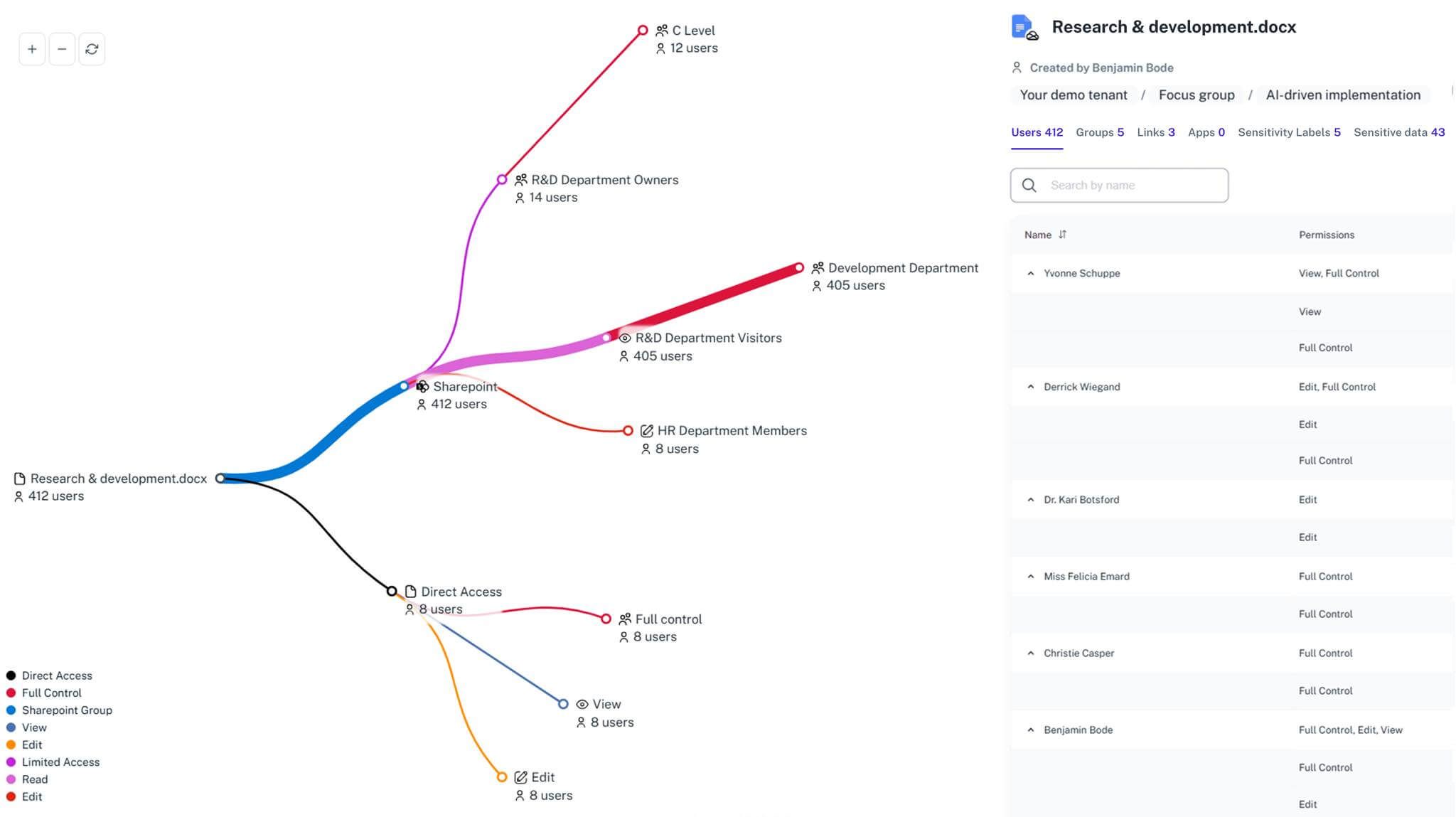
Now, add AI. Microsoft Copilot acts as a magnifier for permission flaws. If a user technically has access to an HR folder due to poor least privilege enforcement, the AI will fetch those salaries for them. We are now dealing with "Shadow AI."
The Best Practice: You cannot rely on static security policies to govern dynamic collaboration. You must implement continuous permission intelligence that maps exactly what users and AI agents can see. Secure Microsoft 365 by identifying blind spots before an identity is compromised. Microsoft 365 security isn't just about blocking threats; it's about governing access.
Make Compliance a "Security Nudge," Not an Operational Killer
New regulations are forcing organizations to rethink their compliance reporting. Microsoft regularly updates its platform, but manual checks struggle to keep up. Under NIS2, you may have as little as 24 hours to report an incident. Manual investigation is a massive drain on resources.
The Best Practice: Leverage your alerts to automate the compliance burden. When an alert arrives with the full story—detailing security vulnerabilities, MFA status, and exfiltration paths—auditing becomes instantaneous. Instead of compliance being an operational killer, it becomes a natural byproduct of your security monitoring. It serves as a healthy "nudge" that improves your organization's security posture.
You can also use this data to improve your Secure Score. By constantly monitoring security baselines, you ensure you aren't just checking a box but actually achieving strong security.

How organizations actually get visibility into Microsoft 365
Understanding best practice methodology is one thing. Applying it across your M365 tenant is another.
In practice, most organizations struggle to answer simple questions like:
- Who is accessing this sensitive file right now?
- Is this external guest access legitimate or a breach?
- What data is Copilot surfacing to unauthorized users?
This is where platforms like 1Security are essential. Instead of relying on manual checks across Microsoft Office 365 portals, organizations use a unified view to understand real exposure.
The 1Security Advantage
Modern cybercrime relies on flooding your alert systems and exploiting gaps between security tools. To win, you don't need fewer alerts—you need the right context.
By deploying a comprehensive Forensic Layer that unifies M365 signals into one source of truth, 1Security lets you spot unusual action spikes, understand the blast radius, and stop breaches on time. It is time to stop drowning in log data and start operating with Permission Intelligence.
FAQ
Why is native Microsoft 365 monitoring insufficient? Native tools are fragmented across Microsoft Entra, Defender, and Purview. They often lack the unified context needed to spot complex attacks instantly. To get complete security, you need a unified view.
How does this help with my Microsoft Secure Score? By providing real-time visibility into security features and security settings like MFA usage and admin privileges, 1Security helps you identify gaps that lower your Secure Score.
Does this integrate with Microsoft Intune? Yes. Context from Microsoft Intune regarding device compliance and endpoint health is crucial for understanding if an access attempt is risky or safe.
How do you handle phishing? We correlate signals from Microsoft Defender for Office 365 (such as Safe Links and Safe Attachments alerts) with user activity to identify compromised accounts quickly.
What about MFA and Conditional Access? We monitor MFA failures and Conditional Access Policies to detect suspicious activities. If an account bypasses multi-factor authentication or security defaults, it triggers an immediate alert.
Is this suitable for large enterprises? Yes. M365 generates massive amounts of log data. 1Security handles millions of signals, turning noise into clear intelligence for your security services team.
Do you have a security checklist feature? Yes. 1Security maps findings to common control frameworks, acting as a dynamic checklist to help organizations demonstrate compliance more efficiently.
Can non-technical stakeholders use it? Yes. Plain-language reports make it easy for compliance, legal, and business stakeholders to see evidence without needing admin rights.
Is this only for large enterprises? No. While designed for complex environments, 1Security is equally valuable for mid-sized organizations using Microsoft 365 that need strong visibility into access and data security.