TL;DR:
- Basic passwords leave your data exposed. Enforce multifactor authentication for every user through Conditional Access to block unauthorized access.
- Legacy authentication is a backdoor around every modern control. Disable it completely.
- The real perimeter isn't the network — it's permissions. In 2026, Copilot makes every over-permission instantly discoverable, so who-can-reach-what is now a live security question, not a housekeeping one.
- Apps and AI agents are identities too. They read, create, and move data autonomously — and they now outnumber your people. Governing their permissions isn't enough; you have to audit what they actually do.
- A control you can't prove isn't a control. If you can't reconstruct who — or what — had access, when it changed, and how the change happened, you can't answer an auditor or an incident.
- Logging is not a checkbox. Audit Standard retains just 180 days and deletes silently after that — most teams discover the gap mid-investigation. Enabling logs, extending retention, and capturing the high-value forensic events is where readiness is won or lost.
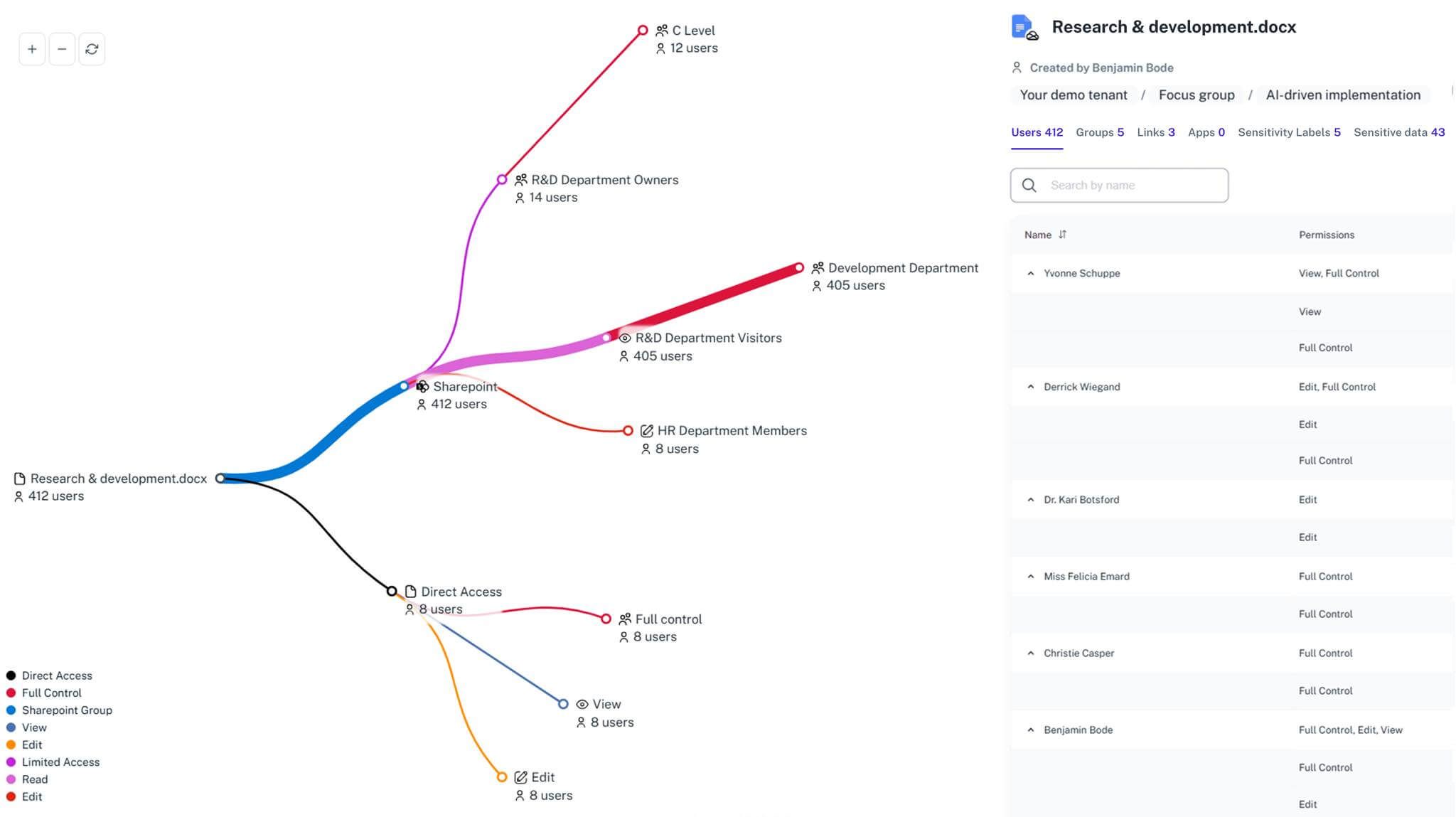
- Native admin centers hide structural risk across silos. Correlating permissions, sensitivity, and activity in one place shows you exactly who can reach your sensitive files — and how they got there.
Securing a tenant without a checklist is like locking a large office building by randomly checking doors. You bolt the main entrance and someone leaves the fire escape wide open. But locking doors is only half the job. The harder question — the one that decides whether you survive an audit or an incident — is whether you know who holds every key, and can prove how they got it. Your Microsoft 365 tenant is the backbone for your files, email, and chat, so any missed setting becomes attack surface, and stale permissions and weak accounts are what turn into breaches.
This checklist covers the hardening every tenant needs. It also covers the things most "best practices" posts skip and that matter most in 2026: forensic readiness — the logging and retention that let you reconstruct what happened — permission visibility in the age of AI, now that Copilot surfaces whatever a user can technically reach, and the identities almost nobody is watching: the apps and AI agents that consume and create your data. 1Security works like a master-key system: it correlates permissions, sensitivity, and activity across your estate — human and non-human — so scattered best practices become concrete permission maps you can act on, and an audit trail you can stand behind.
Throughout, keep three questions in mind. If you can answer all three today, you're ahead of most tenants:
- Who — or what app or agent — can reach your most confidential files right now, and can you prove it?
- When access changed last month, do you know who changed it, when, and why?
- If a regulator or an incident asks "what happened," can you reconstruct it — or is the evidence already gone?
For security leads and admins: You manage thousands of overlapping policies across multiple admin centers. Verifying settings by hand wastes time and leaves blind spots, and tracking SharePoint permissions in particular needs better tooling so nothing slips through — and so the trail survives long enough to be useful.
→ See how real-time monitoring works with 1Security
What this article covers:
- Enforcing strict identity boundaries to stop unauthorized logins
- Securing email and collaboration against modern phishing
- Controlling data sharing across Teams, SharePoint, and OneDrive — including what Copilot can now surface
- Using Purview and Intune to lock down data and endpoints
- Governing and auditing apps and AI agents as the data actors they are
- Building the logging and retention that make you forensic-ready, not just well-configured
Identity & Access: Identity Is the New Perimeter
Identity controls top every official Microsoft audit guide, yet many tenants still require multifactor authentication for only a subset of users and leave legacy authentication on. That combination bypasses modern security entirely and creates a high-value target. Assign the wrong rights to one identity and everything downstream is at risk — because in Microsoft 365, a permission is a decision, and every service honors it without asking whether it still makes sense.
This is also where the forensic trail begins. Every access decision — a role granted, a group joined, an admin elevated — should be something you can reconstruct later. If you can't say who granted an identity its rights and when, you can't investigate how a breach reached your data.
Enforce multifactor authentication for all users through Conditional Access, and disable legacy protocols completely. Require compliant devices for sensitive apps, and restrict logins by risk level and geography. Keep Global Admins to a minimum — Microsoft recommends fewer than five, with dedicated break-glass emergency accounts kept as a documented exception — and use Privileged Identity Management for just-in-time rights instead of standing privileges. Standing admin rights are both a breach risk and a forensic blind spot: the fewer permanent privileges exist, the shorter the list of "who could have done this."
The AI dimension makes identity hygiene urgent, not optional. Copilot operates strictly inside a user's existing permissions — it never bypasses them — but that's exactly the problem. Whatever an identity can technically reach, Copilot can surface. Every over-broad group membership and forgotten access grant becomes an AI query away from exposure. Identity is no longer just the login perimeter; it's the boundary of what your AI will reveal.
Key checklist items to verify:
- Multifactor authentication is active for every user account via Conditional Access
- Basic (legacy) authentication protocols are disabled across the tenant
- Global Admin count is minimized (target fewer than five), with break-glass accounts documented and PIM used for elevation
- Stale guest accounts are inventoried and removed from Entra
- Admin role assignments and changes are logged and reviewed on a schedule
Email & Collaboration: Defender for Office 365
Email is still the top attack vector. Default spam filters plus weak sender authentication let attackers spoof your domains and slip past basic protection.
Configure SPF, DKIM, and DMARC with strict reject or quarantine policies so every sender is authenticated. Turn on Safe Links and Safe Attachments across Exchange Online and the Office apps to block malicious content, and review transport rules to stop risky auto-forwarding to external addresses — a classic, quiet exfiltration path.
The forensic angle matters here too. When a mailbox is compromised, the question that decides your incident response is which messages did the attacker actually read or forward — and answering it depends on mailbox access events (like when mail items were accessed) being captured and retained. That capability isn't automatic on every license tier, which is exactly why the auditing section below is not optional reading.
Key checklist items to verify:
- DMARC is set to quarantine or reject in production
- Impersonation protection is active for all company VIPs
- External auto-forwarding rules are blocked or tightly controlled
- Mailbox access and mail-flow events are being logged for later investigation
SharePoint, OneDrive, and Teams: Data & Sharing Controls
- Sharing misconfigurations are one of the biggest risk areas in any tenant — and the single area where the AI era changes the stakes most. Permissions inherit from the parent site down to libraries and items, and the trouble starts when people break inheritance carelessly or assign access directly to individuals instead of using groups. Over time that produces a tangle nobody can audit, and open sharing links quietly expose data outside the org.
- Two problems compound here. First, broken inheritance and direct grants don't just widen access — they make the access trail nearly impossible to reconstruct, which is the difference between a five-minute answer and a five-week investigation. Second, Copilot removes the natural safety of obscurity. Before Copilot, overshared content was a latent risk because someone had to know a file existed and navigate to it. Copilot eliminates that friction: ask a question, and it surfaces anything the user can technically access. Unintentional access is now exactly as dangerous as intentional access.
- The patterns that cause the most Copilot oversharing are worth naming, because they're the ones to hunt down first: legacy "Everyone except external users" and "All Employees" grants, broken permission inheritance, and organization-wide or anonymous sharing links. A 2025 Gartner survey found roughly 40% of organizations delayed their Copilot rollout by three months or more over oversharing concerns — and independent analysis puts around 16% of business-critical data in the average tenant in an overshared state. The lesson isn't "don't deploy AI." It's that Copilot is a permissions test you're now taking whether you studied or not.
- The short version: assign permissions to SharePoint groups (Owners, Members, Visitors), not individuals; manage those groups through Microsoft Entra rather than editing permissions by hand; break inheritance only for a clear, documented reason; and review who can reach sensitive sites on a schedule. Because every Team sits on a Microsoft 365 group and a SharePoint site, a guest added to a Team also gets the site's files — so watch external access down to the item level.
- One reframe to carry with you: if Copilot ever surfaces content you didn't expect, the correct response is to investigate why that user has access to that site — not to assume Copilot did something wrong. That instinct — treating an AI surprise as a permissions signal — is the whole discipline in one sentence.
Key checklist items to verify:
- Anonymous and organization-wide sharing links are disabled where not strictly required
- Legacy broad grants ("Everyone except external users," "All Employees") are removed from sensitive sites
- Default sharing links are set to "specific people," and guest capabilities (channel creation, content deletion) are limited
- High-risk sites are reviewed before Copilot is enabled against them
Data Protection & Compliance: Purview and Retention
Many organizations rely on manual labeling and struggle to categorize their data, especially the unstructured content sitting in OneDrive. Without a strategy, they miss compliance requirements and can't reliably prevent data loss.
Define a clear sensitivity label taxonomy and use auto-labeling for regulated data types. Add Data Loss Prevention policies to block or warn on external sharing of critical information, and set retention policies that match your legal and business requirements. Labels do double duty in the AI era: sensitivity labels with encryption can stop Copilot from reading and summarizing your most confidential files, turning classification into an access control rather than just a stamp.
This is also where EU compliance gets concrete. NIS2 and DORA don't just ask whether you had controls — they ask whether you can produce evidence of what happened and when. That turns labeling, DLP, and retention from a compliance formality into the raw material of an investigation. A sensitivity label tells you what a file is; combined with real access data, it tells you whether the wrong people can reach it — which is the question a regulator actually cares about.
Key checklist items to verify:
- Sensitivity labels are published via policies to the relevant users and groups, with encryption on the top confidentiality tiers
- DLP simulation mode is used to tune rules before enforcing blocks on high-risk flows
- Retention labels are applied to records and special cases like HR documents
- Label coverage is mapped against your NIS2/DORA obligations, not just internal policy
Endpoint & Device Security: Stopping Threats at the Source
Securing the cloud while ignoring endpoints leaves an obvious hole. Unmanaged devices give attackers an easy way in, and locking down a file means little if the device opening it is already compromised.
Onboard all supported devices to Defender for Endpoint for real-time protection and automated investigation. Use Intune to enforce device compliance, apply hardening baselines, and restrict local admin rights. Endpoint signals aren't a separate world — they feed the same investigation trail as identity and data events, which is why correlation across all three is what turns scattered alerts into a story you can act on.
Key checklist items to verify:
- All supported hardware is onboarded to Defender for Endpoint
- Intune enforces OS version and encryption compliance across devices
- Local admin rights are restricted to keep access least-privilege
Apps and AI Agents: The Non-Human Identities Consuming and Creating Your Data
Every security program obsesses over user accounts. Meanwhile, the fastest-growing identities in your tenant aren't people at all. OAuth apps, service principals, managed identities, and now AI agents authenticate, hold permissions, and act on your data around the clock — and in most tenants they already outnumber the humans. Treating them as background plumbing is the blind spot attackers count on. Microsoft's own 2025 Digital Defense Report flagged a sharp rise in incidents involving non-human identity abuse; service principals have been called the forgotten cousins of MFA for a reason.
This goes well beyond "shadow IT" and unsanctioned AI. The riskier identity is often the one you approved — the third-party app someone granted tenant-wide Mail.Read or Sites.FullControl.All to during a project two years ago, still holding those rights, with no owner and a client secret nobody has rotated. An app with application-level Graph permissions doesn't need a user to sign in; it reads across the whole tenant on its own authority. A single over-consented app can quietly touch every mailbox and every site — and because it's "internal" and "approved," nobody's watching what it does.
Agents raise the stakes again, because they are data creators as much as consumers. A Copilot Studio agent a business user built and pointed at a sensitive SharePoint site doesn't just read that data — it summarizes it, generates new documents from it, and can share those outputs, spawning a brand-new oversharing surface with its own permissions. And when an agent acts on behalf of a user, accountability splits three ways: which user, which agent, and under whose authority did the action happen? Prompt injection turns this into a classic confused-deputy problem — an attacker tricks the agent into using its access to reach data the attacker never could. "Who did this?" stops being a simple question exactly when you most need the answer.
Microsoft has started building the identity plumbing for this. Entra Agent ID, which reached general availability in 2026, gives each agent a first-class identity with a human owner or sponsor accountable for it, Conditional Access that applies to agent actions, lifecycle controls, and — critically — logged authentication and activity. That's the right foundation, but it only helps if you use it: inventory what's already running, assign ownership, right-size permissions, and make access time-bound. The governance gap most tenants have isn't a lack of tooling; it's that no one has looked.
The forensic point is what ties this section to the rest of the checklist. It isn't enough to know an app or agent has access — you have to be able to reconstruct what it did: which files it read last quarter, what it created, where the data went, and who authorized the grant in the first place. That trail is the weakest in most estates, and it's exactly where NIS2 and DORA accountability will land when the actor in an incident turns out to be a machine, not a person.
Key checklist items to verify:
- Every app registration, enterprise app, service principal, and agent is inventoried, with a named owner or sponsor
- App and agent permissions are reviewed for over-broad, tenant-wide Graph scopes — especially application-level permissions and stale consent grants
- Credentials and secrets are rotated, and access is time-bound rather than standing
- App and agent actions — not just their permissions — are logged, retained, and reconstructable
- New consent grants and permission changes for non-human identities trigger review
Monitoring, Auditing, and Secure Score: Continuous Improvement
Treat security as a one-time setup and it drifts. But there's a deeper trap: confusing good configuration with forensic readiness. They're different jobs. Secure Score tells you whether you're set up well. Auditing and monitoring tell you whether you could reconstruct what happened when something goes wrong. You need both, and most guides only cover the first.
Posture (Secure Score). Treat the Microsoft Secure Score as a prioritized backlog, not a vanity metric, and track it over time. Address software and firmware vulnerabilities with Defender Vulnerability Management, and work the highest-impact identity and email actions first.
Forensic readiness (auditing and retention). This is the part tenants discover too late — usually mid-investigation, when the evidence is already gone. A few realities worth knowing before you need them:
- Verify logging is actually on. Unified audit logging is enabled by default for enterprise Microsoft 365 organizations, but not for Business (SMB) plans or unmanaged trial tenants. Don't assume — confirm it.
- Standard retention is only 180 days, and it deletes silently. With Audit (Standard), records are kept for 180 days with no option to extend and no warning before deletion — on day 181 the oldest records simply start disappearing. Older tenants are worse off: logs generated before October 17, 2023 were retained for only 90 days.
- Premium buys a year — for some events. Audit (Premium), available with E5 or the equivalent add-on, retains Exchange, SharePoint, OneDrive, and Entra records for one year by default, with everything else at 180 days unless you build custom retention policies. Ten-year retention requires a separate add-on.
- On E3, you extend retention outside Microsoft. E3 tenants can't extend retention in-product at all. The options are exporting logs on a schedule via the Management Activity API, or streaming them to a SIEM where you control retention.
- The high-value forensic events are gated. The events that let you determine the scope of a breach — such as which mail items an attacker actually accessed — are premium "intelligent insights" events. Without them, you may know you were breached but not how far it went.
The principle underneath all of this: you cannot investigate what you never logged, and you cannot prove what you no longer retain. Retention is a prerequisite for forensics, not a nice-to-have — and for NIS2 and DORA, an incident you only discover months later is exactly the case the 180-day default won't survive.
Monitoring. Configure centralized alerts for the events that matter — new Global Admins, mass file downloads, unusual sharing patterns, permission changes on sensitive sites, and new app consent grants or agent registrations — and watch for drift, not just point-in-time misconfiguration. Remember that the actor behind a risky action is increasingly an app or agent, not a person, so your monitoring has to cover non-human identities too.
Key checklist items to verify:
- Unified audit logging is confirmed on (especially on Business-tier or migrated tenants)
- Retention is extended beyond the 180-day default to match your legal, regulatory, and investigation needs
- High-value audit events are captured (or logs are exported/streamed to a SIEM where they aren't)
- Alerts are configured for new admins, mass downloads, anomalous sign-ins, and sensitive-site permission changes
- App and agent activity is captured in the same audit trail, so a non-human actor's actions can be reconstructed
How Organizations Gain Visibility
Applying all of this across a large tenant while hard in practice. Secure Score tells you what to do, but confirming that a change actually fixed the exposure — and that it's still fixed next quarter — means constant manual digging across admin centers that don't talk to each other. The questions that stay open are the ones that matter most:
- Which external users can reach your most confidential files?
- Which sites are currently exposed to temporary guests?
- How have administrative rights shifted in the last 30 days — and who changed them?
Notice that none of these is answered by a setting. Each requires correlating permissions, sensitivity, and activity across silos, and each requires history — the ability to look back, not just look now. That combination, visibility plus reconstructable history, is where posture management ends and forensic readiness begins.
1Security closes that gap with tenant-wide visibility into your real configuration. It centralizes alerts and evidence about risky actions, so you stop depending on scattered admin centers, and it keeps the forensic trail intact so "who could reach this, and how did they get there" is a question with an answer. This is also where permission creep and data classification gaps surface before they become incidents — or Copilot queries.
The 1Security Advantage
1Security turns scattered guidelines into permission maps you can act on. It combines your Purview labels with real access data to show exactly where sensitive data is exposed, so you can validate each assignment instead of assuming it's correct — for people and for the apps and agents acting alongside them. Its edge isn't simply keeping logs — it's reconstructing the forensic permission trail and correlating it across your M365 estate, so you can answer not just who or what has access but how they got it, when it changed, and what they did with it. You get automated, audit-ready evidence that your controls are working — the kind NIS2 and DORA actually ask for — layered on top of native Microsoft features rather than replacing them.
Stop guessing about your security posture — and stop hoping the evidence will be there when you need it. Request a demo of 1Security today.
FAQ
Why is legacy authentication a security risk?
bypasses modern protections like multifactor authentication, so disabling it shuts down a common path for brute-force and password-spray attacks.
How does Conditional Access improve security? It enforces rules based on user risk, device compliance, and location, so only trusted sign-ins succeed on approved devices.
What's the recommended number of Global Admins? Keep it low — Microsoft recommends fewer than five — and use Privileged Identity Management for temporary elevation instead of standing rights. Maintain dedicated break-glass emergency accounts as a documented exception.
Does Microsoft 365 Copilot create a security risk? Copilot never bypasses permissions — it only surfaces content a user can already access. The risk is that it makes existing oversharing instantly discoverable: content that was safe by obscurity becomes an AI query away. Fixing it means fixing the underlying permissions, not restricting the AI. If Copilot surfaces something unexpected, investigate why that access exists.
How long does Microsoft 365 keep audit logs? By default, Audit (Standard) retains records for 180 days and then deletes them with no warning. Audit (Premium), on E5 or an equivalent add-on, keeps core workload records for one year, with a 10-year option via a separate add-on. On lower tiers, you extend retention by exporting logs or streaming them to a SIEM.
Why does log retention matter for compliance? NIS2 and DORA require you to evidence what happened during an incident. Because breaches are often discovered months after the fact, the default 180-day window frequently leaves you unable to reconstruct or prove the event — which is a compliance failure, not just an operational one.
Why do apps and AI agents need to be treated as identities? Because they authenticate, hold permissions, and act on your data autonomously — reading, creating, and moving it — often with broader, tenant-wide access than any single user. In most tenants they already outnumber people, and Microsoft's 2025 reporting noted a sharp rise in non-human identity abuse. Governing their permissions and auditing their actions is now as important as managing user accounts.
Isn't this just a shadow IT problem? No. Unsanctioned tools are one risk, but the bigger exposure is often an app or agent you approved — an over-permissioned third-party app with stale consent, or an internally built agent pointed at sensitive data. "Approved" doesn't mean "watched." The gap is usually that no one has inventoried what's running or reviewed what it can reach.
How do you audit what an app or AI agent actually does? Knowing an app or agent has access isn't enough; you need to reconstruct what it did. Microsoft's Entra Agent ID gives agents first-class identities with owners, Conditional Access, and logged activity, and app and agent events flow into the unified audit log — but only if logging and retention are configured to capture and keep them. The goal is to be able to answer, after the fact, which non-human identity touched which data, when, and on whose authority.
How do sensitivity labels protect confidential data? They classify files by confidentiality level and enforce the matching rules, including encryption that can block Copilot from reading the most sensitive content. Auto-labeling extends this to unstructured content like contracts and HR documents.
What's the purpose of Data Loss Prevention policies? DLP monitors and blocks the unsafe transfer of sensitive information like PII and payment data, preventing accidental sharing outside the company.
How often should we review the Microsoft Secure Score? Regularly, and by category — treat it as a prioritized risk backlog, especially around identity and email. Just remember Secure Score measures configuration, not forensic readiness; you need auditing and retention for the latter.
How does 1Security complement native Microsoft tools? It correlates monitoring alerts with sensitive-data context and exact configuration details, reconstructs the permission trail across silos, and produces continuous audit-ready evidence — showing in real time that your native controls are working, and letting you prove it later.