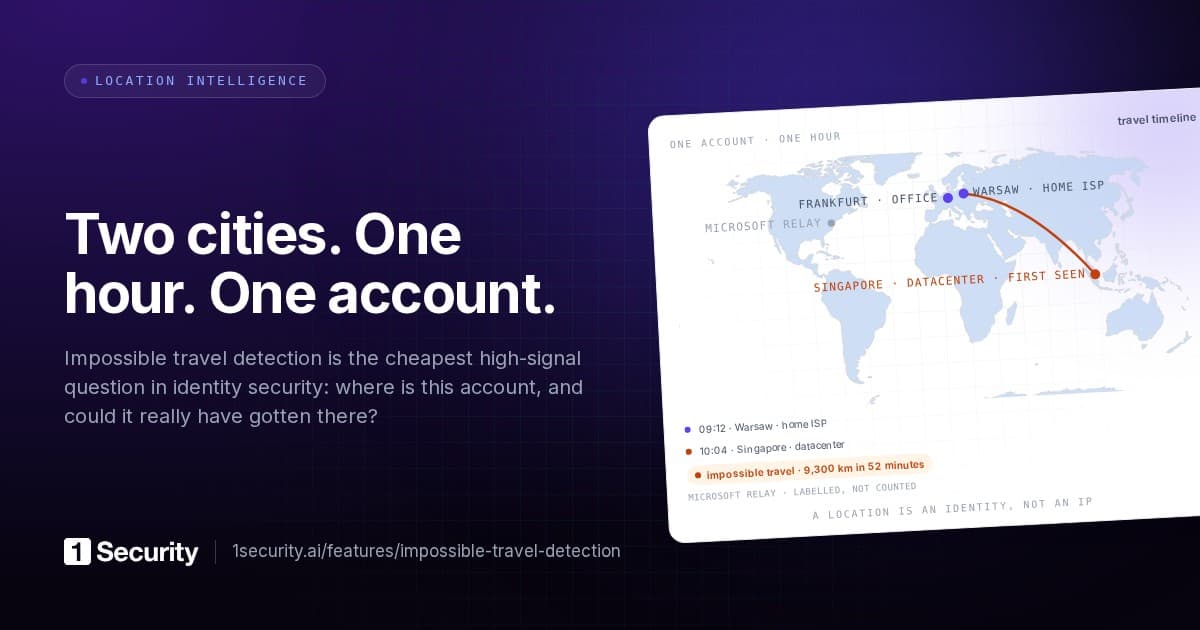
Impossible travel is one of the few detections non-technical people understand immediately. Two events, two places, not enough time in between. Somebody isn't who they say they are.
It also gets sold as a premium feature. Enable the right licence tier and a risk engine somewhere decides a sign-in was atypical, hands you a score, and doesn't explain itself.
Both things are true at once. It's genuinely useful, and it isn't expensive. The calculation is trivial and the events are already in your audit logs. What separates travel detection that produces leads from travel detection that produces noise is four decisions nobody tells you about. Get one of them wrong and you end up with the thing so many teams have quietly switched off.
What the calculation actually is
Take two events from the same identity. Each has a place and a time. Compute the distance between the places, divide by the elapsed time, and you have an implied speed.
If that speed exceeds what a human could plausibly achieve, including a flight, a connection and the trip to and from the airport, then at least one of those two events wasn't produced by that human.
That's the whole method. No model, no training, no scoring engine. A junior analyst can implement it in an afternoon.
Which raises an obvious question. If it's this simple, why is everybody's version so bad?
Failure one: the platform's own traffic
This is the big one, and it invalidates more travel detections than everything else combined.
A large share of Microsoft 365 audit events don't carry the user's address. They carry the address of the Microsoft server that performed the operation: server-side mailbox actions, background SharePoint work, Copilot interactions, compliance machinery, anything acting with application permissions.
Feed those into a travel calculation and you get a transatlantic flight in four minutes, every day, for every user with a mailbox rule or a Copilot habit. The detection is arithmetically perfect and completely useless.
The fix isn't to suppress datacenter traffic, which would hide the real thing, since credential theft increasingly gets run from rented infrastructure. The fix is narrower and more specific. Infrastructure egress is never a travel waypoint. Platform-origin events stay in your logs as evidence of what happened. They just don't get a chair at the travel table, because they describe where a service ran rather than where a person was.
Any travel implementation that hasn't made this distinction explicitly is reporting on Microsoft's data centres, not on your users.
Failure two: the address is not the place
The second failure is subtler. Two consecutive events from the same person, both entirely legitimate, can resolve to addresses hundreds of kilometres apart. Mobile carriers centralise their egress. A corporate VPN terminates in another country. A home ISP rotates the address into a different pool.
If your unit of measurement is the address, you're measuring the network's topology rather than the person's movement.
Travel has to be computed between stable places, meaning a country, a city and the network that owns the connection, and it has to know when the network type makes the coordinates meaningless. A commercial VPN exit in Amsterdam tells you where the VPN is, not where the user is. Treat it as a waypoint and you get a flight to Amsterdam and back every time someone opens their laptop on a train.
Failure three: no sense of normal
Here's a scenario every implementation gets wrong at least once.
A salesperson flies to a conference and signs in from the hotel. Impossible travel fires, correctly and technically, because they were in Warsaw eight hours ago and eight hours isn't enough for the route the calculation assumed.
That's a false positive and it's unavoidable in isolation. What makes it survivable is context. This account has been seen in nine countries over the past year, and its travel pattern is a salesperson's. The finance clerk who has never been observed outside one city, and who suddenly appears in a country they've never been to, at three in the morning, over a hosting provider, is a completely different row. Even though the arithmetic verdict on both is identical.
Travel without a baseline is a speed check. Travel with per-identity history is a lead. The difference is whether you have a travel timeline for each identity in the first place: everywhere it's been seen active, how often, and when it was first and last seen there.
Failure four: precision theatre
Geo-IP resolution is approximate. City-level accuracy is decent in dense markets and poor elsewhere. Two addresses in the same metropolitan area routinely resolve to points thirty kilometres apart, which at a five-minute interval gives you an implied speed of several hundred kilometres per hour.
Any implementation that reports "impossible" on that is manufacturing false positives out of its own measurement error.
The honest treatment is to accept the fuzziness and let it set the floor. Places close enough together to be the same metropolitan area count as the same place. Legs below a meaningful distance threshold don't produce verdicts. And the verdict language should carry its own uncertainty, so plausible, questionable and impossible rather than a binary the underlying data can't support.
What a good travel view looks like
Once those four failures are handled, the output stops being an alert stream and becomes something better: a readable record of where each identity has actually been.
The useful shape is a sequence of visits and legs.
- A visit is a stay. A place, when the identity first and last appeared there, and how much activity happened.
- A leg is the movement between two consecutive visits, carrying the distance, the elapsed time, the implied speed and a verdict.
Presented that way, an investigation reads as a story rather than a query. This account sat in Warsaw for three weeks, then produced forty minutes of activity from a hosting provider in another country, then went back to Warsaw. Nobody needs a risk score to understand what that sentence means.
The same view answers questions travel detection doesn't usually get asked. Which of our people are genuinely mobile and which have a fixed footprint? Which devices have started appearing in places they never used to? When a machine rather than a person starts showing travel, that's often more interesting than the user, because devices are supposed to be boring.
A practical build order
If you're assembling this yourself the order matters, because each step is worthless without the one before it.
- Resolve places, not addresses. Country, city and network owner, with dynamic addresses collapsing into one identity per place.
- Classify the network. Standard, VPN, Tor, datacenter, platform. You need this to know which coordinates mean anything.
- Exclude platform infrastructure from waypoints. Keep the events, deny them a place on the timeline.
- Build per-identity timelines. Visits before legs. You can't judge a journey without knowing the itinerary.
- Compute legs, with a distance floor and honest verdicts. Then, and only then, alert.
- Pair it with the other two signals. Travel plus an unfamiliar device plus a volume spike is an incident. Travel alone is a question.
Steps one to four are where all the work sits. Step five, the part everyone thinks of as "impossible travel," is an afternoon.
The licensing question, answered plainly
Microsoft's own atypical-travel detection lives in the premium identity tiers, and if you have them, use them. They see sign-in telemetry from across Microsoft's estate that nobody else has.
But the raw material for travel detection on your own tenant is the audit log, and that isn't a premium artefact. The addresses are there. The timestamps are there. What a premium licence buys you is somebody else's implementation of the four decisions above, and it's an implementation you can't inspect, can't tune, and can't ask "why didn't you flag this?"
If you have the premium tier, run both. One that explains itself, one that sees more. If you don't have it, the missing licence isn't the reason you don't have travel detection.
How 1Security does it
Travel builds on the location layer described earlier. Every action resolves to a country, city and network owner, dynamic addresses collapse into stable places, and Microsoft's own infrastructure gets recognised and labelled rather than mistaken for a user.
From there, each user and each device gets a travel view: visits and legs, with distance, elapsed time, implied speed and a verdict per leg, drawn on a map inside the resource's drawer. Infrastructure egress never becomes a waypoint. Where Microsoft supplies the user's real country alongside a relayed address, that signal gets used instead of the relay's coordinates.
Travel sits next to the other two halves of the same story. The device layer shows whether the machine behind a suspicious leg was ever enrolled, or ever authenticated at all. The anomaly layer shows whether the account's activity volume broke its own baseline that day. One timeline, three signals, which is what it takes to catch an attack that looks like an employee.
All of it runs on a standard Microsoft 365 licence, with enrichment performed locally rather than through a third-party lookup service.
Frequently asked questions
What speed threshold should I use? Higher than you think. Commercial aviation plus airport time plus a connection means a real traveller can average a surprising amount over a long interval. The value of the detection sits in the clearly impossible cases, not the marginal ones, so set the bar high enough that a verdict of "impossible" is worth reading every time it appears.
Will this catch a nearby attacker? No. An attacker operating from the same city as the victim produces no travel signal at all. Travel is one input among several, which is exactly why it belongs next to device and volume signals rather than on its own.
What about users who genuinely travel constantly? Their baseline shows it, and that's the point of keeping per-identity history. A footprint across nine countries reads differently from a first-ever appearance abroad, and only a timeline can tell you which one you're looking at.
Do VPNs break this? They break naive versions of it. A commercial VPN exit is the VPN's location, not the user's, which is why network classification has to happen before travel is computed rather than after.